Best File Sharing Site for Business Teams: What to Look For and Why It Matters
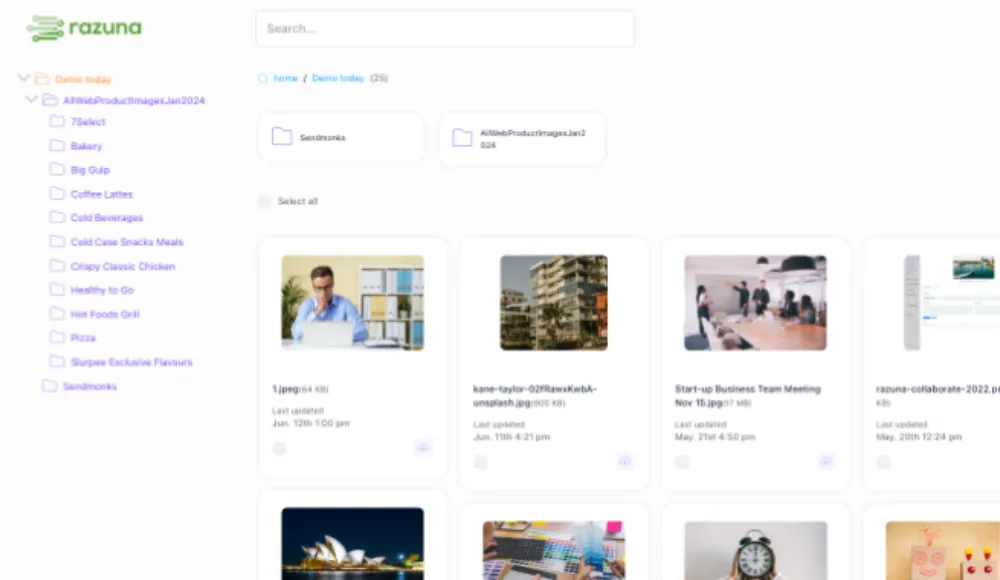
If your team is still using consumer file links, email attachments, or a mix of storage tools, the problem is usually not storage. It is control.
A good business file sharing site should let people find the right file, share it with the right person, and keep track of what happened next. That means permissions, version control, search, and collaboration matter as much as upload speed.
Razuna is built for that kind of work. It gives teams one governed library for brand, marketing, media, and document files, with secure links, audit trails, collections, metadata, and unlimited users on paid plans. If you need more than simple cloud storage, that difference is where the value shows up.
What is a good file sharing site?
A good file sharing site is a secure place where teams can store, organize, and share files without losing visibility or control.
For business use, that usually means:
- Security: access controls, permissioned sharing, and audit trails
- Search: fast retrieval by name, metadata, labels, or file content
- Version control: a clear record of which file is current
- Collaboration: comments, shared collections, and easy handoff between teams
- Large file support: enough headroom for media, design, and document workflows
If a platform only moves files from one person to another, it is storage. If it helps a team govern files end to end, it is closer to file sharing software for business.
Which file sharing site is the best?
The best file sharing site depends on what you are trying to share.
For basic personal use, almost any consumer storage tool can work. For business teams, the best option is usually the one that combines secure access with organization, versioning, and collaboration. That is especially true for agencies, marketing teams, and non-profits that manage repeated approvals, many file types, and outside contributors.
Razuna fits best when you want:
- one place for brand, media, and document files
- secure sharing instead of open, one-off links
- metadata-driven search and file organization
- unlimited users without per-seat pricing pressure
- a system that supports both DAM and document management needs
Business file sharing is not the same as file storage
A shared folder can hold files. A business file sharing site should help your team use them.
That difference matters when multiple people need the same asset, but not the same level of access. Marketing may need a draft, legal may need a final PDF, and an agency partner may need only a specific collection. A simple storage bucket does not solve those workflow problems.
Razuna supports business sharing with:
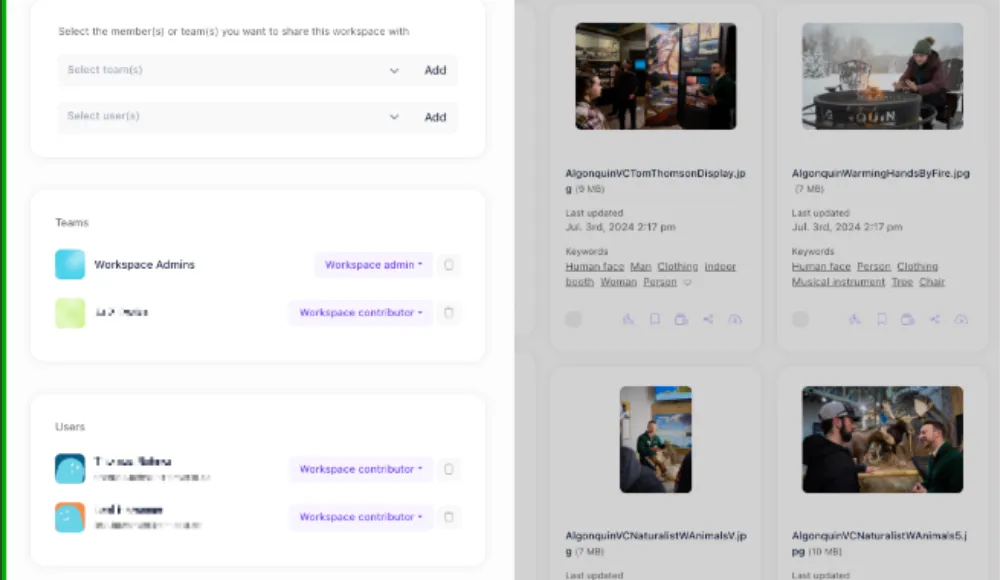
- permissions for controlling who can view or edit
- collections for grouping related files
- secure links for controlled delivery
- version control so teams know which file is approved
- audit trails so activity is easier to track
- metadata and labels for finding files later
That makes it useful for teams that want to share files online without creating a mess of duplicate folders and disconnected versions.
What is document management and how does it differ from file storage?
Document management is the process of storing, organizing, securing, and retrieving business documents in a way that makes them easy to manage across teams.
File storage keeps documents in one place. Document management adds structure around those files so people can find the right version, limit access, and share it safely.
Here is the practical difference:
| File storage | Document management |
|---|---|
| Saves files in folders | Organizes files with metadata, labels, and structure |
| Focuses on space and upload | Focuses on retrieval, control, and workflow |
| Often depends on manual naming | Supports search and consistent organization |
| Can be hard to audit | Helps track access and file changes |
Razuna supports document organization with searchable metadata, labels, permissions, version control, and secure sharing. That is useful when your team needs more than a folder tree, especially for contracts, PDFs, internal docs, and approved collateral.
How Razuna helps teams share files securely
Razuna is built around the idea that sharing should not mean losing control.
Instead of scattering files across email threads and personal drives, you can keep them in one library and control how they move. Teams use Razuna to organize files by metadata, search them quickly, share them through controlled links, and keep version history visible.
Useful features for secure business sharing include:
- Automatic metadata for faster organization
- Custom fields for team-specific file details
- AI-powered discovery to surface the right asset faster
- Permissions and access controls to limit visibility
- Version control to reduce confusion over drafts
- Collections and workspaces for project-based sharing
- Audit trails for accountability
If your team also manages images, videos, PDFs, Word documents, or brand files, Razuna acts as more than file sharing software. It becomes a file organization system that keeps work moving.
What makes a good file sharing site for business?
A good file sharing site for business should do five things well:
- Protect files Access should be controlled, not assumed. Different users need different levels of visibility.
- Make files easy to find Search should work across names, metadata, labels, and document content where possible.
- Keep versions clear Teams should know what is current, what is approved, and what is still being reviewed.
- Support collaboration Shared collections, comments, and handoff workflows reduce back-and-forth.
- Handle real business file types Agencies and marketing teams do not just share PDFs. They share images, videos, presentations, and working drafts too.
Razuna covers those needs with one governed library, which is why it works well for teams that need secure file sharing for small business use as well as larger cross-functional groups.
Best file sharing use cases by team
Agencies
Agencies need a clean way to share campaign files with clients, freelancers, and internal teams. That usually means more than a download link. It means the ability to keep assets organized by client, preserve approved versions, and share only what is needed for review.
Razuna helps agencies centralize creative assets, track versions, and keep client-facing files separated from internal drafts.
Marketing teams
Marketing teams are often juggling brand files, launch materials, landing page documents, and campaign assets at the same time. Without a shared system, duplicate files spread fast.
Razuna supports marketing workflows with metadata, labels, search, and permissions, so teams can keep one source of truth for approved assets and documents.
Non-profits
Non-profits often work with small teams and outside partners, which makes secure sharing important. They may need to distribute reports, grants, event assets, or donor materials while limiting who can edit or repurpose them.
Razuna gives non-profits a shared file system that is easier to control than open cloud folders and more organized than email attachments.
File organizer software, not just storage
People often search for file organizer software or file organization software when what they really need is a system that keeps files usable over time.
That is where Razuna fits well. It helps teams organize files with:
- folders and collections
- tags and labels
- metadata and custom fields
- search across file details
- permissions for controlled access
If you are comparing digital file organization software, look for the layer above storage. The tool should help your team retrieve, approve, and share files without rebuilding the same folder structure every quarter.
For a deeper look at how Razuna handles discovery, see auto-tagging in Razuna and custom fields for file metadata.
Creative asset management and brand asset management
For creative teams, file sharing is usually part of a bigger workflow. Assets need to stay organized, approved, and on-brand.
Creative asset management keeps design files, campaign assets, and approvals in one organized workspace. Brand asset management does the same thing for logos, brand guidelines, and approved collateral, with added emphasis on version control and consistency.
Razuna supports both use cases with:
- version control for approved files
- permissions for internal and external stakeholders
- collections for campaign or brand sets
- metadata and labels for faster discovery
- secure sharing for controlled distribution
If your team needs a broader platform view, also read what is a creative asset management system and top brand management solutions.
Razuna for teams comparing file sharing websites
If you are comparing file sharing websites, the real question is not which tool has the simplest upload screen. It is which tool can handle business sharing without losing track of the work.
Razuna is a strong fit when you want:
- secure team sharing
- document management and media management in one place
- search built around metadata, labels, and custom fields
- unlimited users on paid plans
- one system for brand, creative, and document files
For teams asking "what is a good file sharing site" or "what makes a good file sharing site", the short answer is this: look for control, search, and collaboration first.
Related comparisons and next steps
If you are exploring alternatives and category pages, these related resources can help:
- Best Brandfolder alternatives for teams
- Bynder competitors and DAM options
- What is DAM software?
- How Razuna supports cloud digital asset management
These pages are useful if your buying process includes DAM, brand asset management, or creative file organization alongside file sharing.
Frequently Asked Questions
What is a good file sharing site for business?
A good file sharing site for business is one that combines secure access, easy search, version control, and collaboration. It should help teams control who can see files, keep approved versions clear, and find assets quickly. Razuna is designed for that kind of workflow with permissions, metadata, collections, and secure links.
What makes a good file sharing site?
A good file sharing site protects files, makes them easy to find, and supports team workflows. Security, permissions, version control, and search are the key features to look for. If a platform only stores files but does not help organize or govern them, it will usually create more work later.
What is document management?
Document management is the process of storing, organizing, securing, and retrieving documents so teams can manage them efficiently. It goes beyond basic file storage by adding structure, access control, and search. Razuna supports document management with metadata, labels, permissions, and secure sharing.
Is Razuna a file sharing site or a DAM platform?
Razuna is both a secure file sharing platform and a DAM-style library for teams that need more organization. It supports brand, creative, media, and document files in one system. That makes it a better fit than simple storage tools when teams need governance as well as sharing.
Can small businesses use Razuna for secure file sharing?
Yes. Razuna is a practical option for small business file sharing because it offers secure access, unlimited users on paid plans, and a structure that helps teams avoid duplicate files. It works well when a small team needs more control than consumer storage tools provide.
How does Razuna help with file organization?
Razuna helps teams organize files through metadata, labels, custom fields, collections, and search. It is designed as file organizer software for teams that need to sort large libraries without relying only on folders. That makes retrieval faster and reduces confusion around file versions.
The bottom line
The best file sharing site for business is the one that helps your team share files without losing control of them.
If you need secure access, better organization, and a place to manage documents, creative assets, and brand files together, Razuna gives you that structure. It is a stronger fit than generic storage when file sharing is part of a real team workflow.
For the sharing and access-control details, see New in Razuna: Collections & sharing of individual files and Brand Governance Without the Bureaucracy: How DAM Access Control Actually Works.
Explore secure file sharing with Razuna to see how these practices fit your team’s workflow.