Digital asset management for small business
Keep product photos, logos, videos, and documents organized as your team grows. Start with 500 GB, 5 users, and 2 workspaces free. Paid plans add unlimited users without per-seat fees.
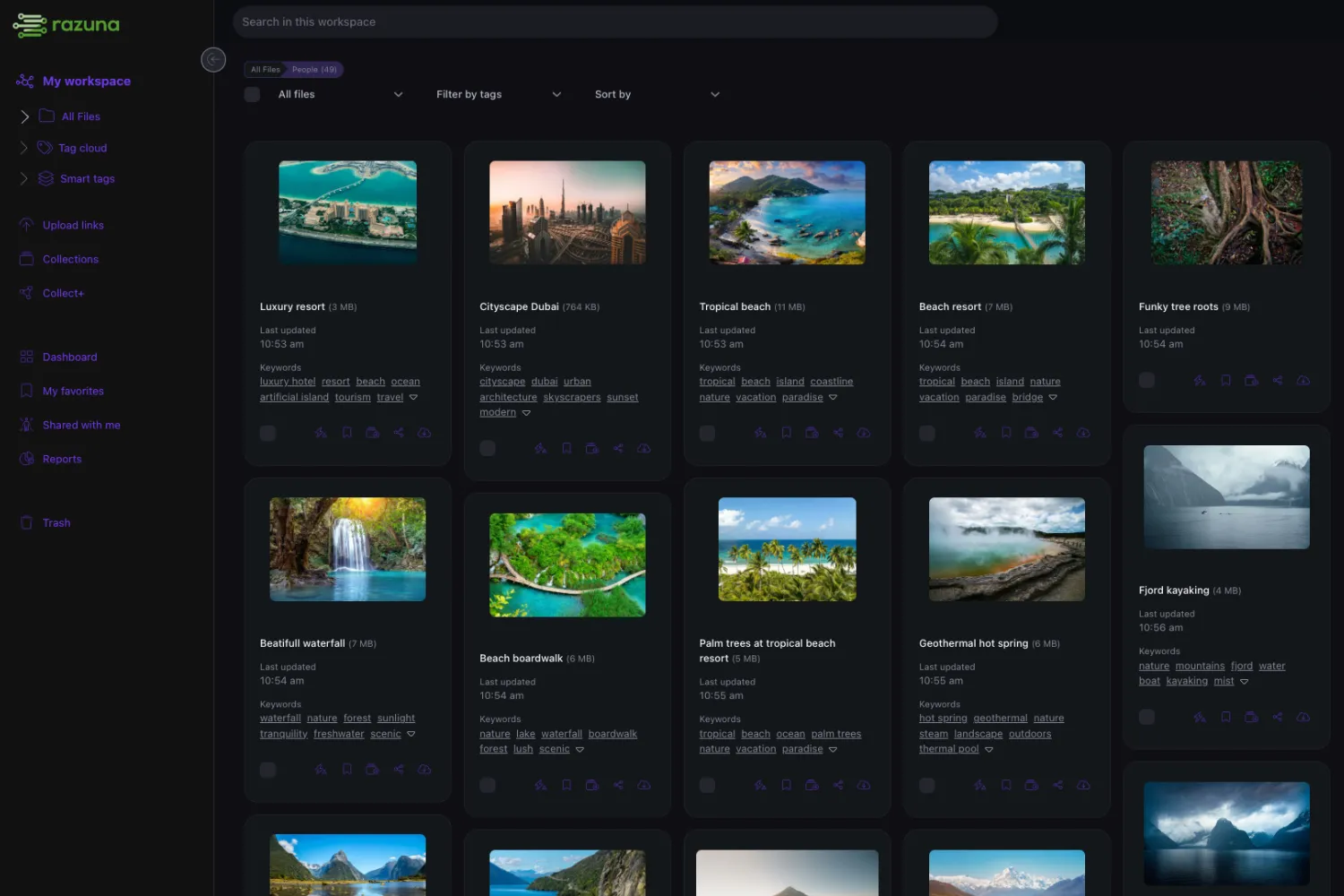
A shared asset library for your small business
When cloud storage breaks — Folders are fine until version confusion, search frustration, and external sharing problems start costing you real time.
Cloud storage vs DAM — Cloud storage organizes by folders. DAM organizes by metadata and purpose — adding findability, approvals, and safe distribution.
Why Razuna — Modern DAM built for small teams: 500 GB free, unlimited users on paid plans, and a simple upgrade path from folders to a governed library.
Jump to:
- Why cloud storage breaks for small business
- Cloud storage vs DAM: what actually changes
- SMB workflows where DAM beats cloud storage
- Comparison: Razuna vs Dropbox vs Google Drive vs Box
- Small business file sharing: secure practices
- DAM features that matter most for SMB
- Pricing models (and what to avoid)
- Migration: folders to a system
- Metadata starter kit
- Vendor checklist for SMB
TLDR:
Small businesses don't just need "a place to put files." They need to answer:
- Where is the file? (not "which folder," but "which version, which campaign, which format")
- Which version is approved? (not just "latest," but safe to use)
- Who is allowed to share it? (internally and externally)
Why cloud storage breaks for small business
Folders start fine, then the cracks show up:
- Search becomes unreliable. People remember "where it was" instead of "what it is." New hires can't find anything without tribal knowledge.
- Version control becomes a guessing game. "final-final-v3" spreads across email, Slack, and shared links. The wrong version leaks.
- Approvals are scattered. Comments live in threads. Decisions aren't attached to the asset. No one knows what's approved.
- External sharing is messy. Multiple links, unclear permissions, no expiration, and no easy way to give clients a single place to self-serve.
- Governance becomes painful. You want view-only for some users, download for others, and proof of who accessed what — folders struggle here.
When these issues show up weekly, it's no longer "cloud storage for small business." It's a content operations problem — and that's where DAM fits.
Cloud storage vs DAM: what actually changes
Think of digital asset management as cloud storage that is optimized for findability, control, and distribution. It's not about storing more files. It's about making the files you already have usable — fast and safely.
A simple rule of thumb:
- If your team mostly collaborates on documents, cloud storage can be enough.
- If your team ships assets (design files, product images, videos, brand collateral) to other teams or external audiences, you'll eventually need DAM-style workflows.
Cloud storage (folders-first)
- Organize by folders and syncing
- Search mostly by name/location
- Sharing via links that drift over time
- Versioning exists, but "approved for use" is unclear
DAM (use-case-first)
- Organize by metadata, collections, and purpose
- Search across tags/fields and often file contents
- Sharing via portals/collections that stay current
- Governance: approvals, permissions, audit trails
If you want the broader foundation (beyond SMB), see the main pillar: digital asset management. For the Razuna product approach, see why teams choose Razuna and features.
SMB workflows where DAM beats cloud storage
Most small businesses don't wake up thinking "we need digital asset management software." They notice symptoms: clients keep asking for files you already sent, sales decks drift out of date, and people recreate work because they can't find the source file.
1) Marketing + brand consistency
When the logo, color palette, product photos, or messaging changes, folders don't tell your team what's current. DAM adds an "approved for use" layer, so anyone — from the founder to a freelancer — can pull the right asset without guessing.
- Typical assets: logos, brand guidelines, ad creatives, social templates, product images, campaign videos.
- What breaks in cloud storage: duplicates across folders, "final" versions scattered across chat/email, and no clear status.
- What DAM changes: search by campaign/product/status, plus a single record for the approved version.
2) Sales collateral + partner enablement
Sales needs the latest deck and one-pagers. Partners need a self-serve place to grab approved assets. With file storage, you end up DM'ing links and hoping people don't use the old version.
With DAM, you can publish a portal or collection so the link stays stable — even as you swap in new versions behind the scenes.
3) Agencies and client deliverables
Client work has a predictable lifecycle: drafts, feedback, revisions, approvals, final delivery. That lifecycle is hard to capture in folders alone. DAM keeps the discussion and history attached to the asset, and it gives clients a cleaner "here's your library" experience.
4) Ecommerce + product content operations
If you sell products, you're managing images, lifestyle shots, spec sheets, packaging, and marketplace requirements. This is where metadata helps the most: you can filter by SKU, region, season, rights, and channel — without creating a folder labyrinth.
Workflow-mapping exercise (10 minutes)
If you're trying to decide whether you need "better cloud storage" or an actual DAM, do this with one real project:
- List the assets that get reused. (logo, product images, templates, deck, case study PDF, videos)
- Write down the decision point. Who says "this is approved," and where does that decision live today?
- Identify the sharing moment. Who needs access externally, and what should they not see?
- Pick 3 metadata fields. For example: Status, Campaign/Client, and Owner. If those three fields would solve most "where is it?" questions, you're already thinking like DAM.
Comparison: Razuna vs Dropbox vs Google Drive vs Box (for SMB)
This isn't a "winner-take-all" situation. Many small businesses use Drive/Dropbox/Box for general files and use DAM as the system of record for approved assets and client-facing sharing.
| Tool | Best for | SMB pros | SMB cons / gotchas |
|---|---|---|---|
| Razuna (DAM) | Teams needing fast search, approvals, and safe external sharing | AI-assisted tagging + search, versions + approvals, client/partner portals, unlimited users | Requires a small amount of initial setup (a few key fields + roles) |
| Dropbox | Simple syncing and file sharing across devices | Easy sync, commonly used by agencies/contractors, good for general collaboration | Folders get messy fast, no "approved for use" status, costs can climb with users |
| Google Drive | Document collaboration in Google Workspace | Great for docs/sheets/slides, easy sharing, strong ecosystem | Creative libraries become hard to govern, folder dependency, no self-serve portals |
| Box | Enterprise content management with compliance features | Strong admin/security, good for strict governance, solid integrations | Can be heavier than what small teams need, higher admin overhead |
Small business file sharing: what "secure" looks like in practice
Secure file sharing isn't only encryption. It's making sure the right people can access the right files, for the right amount of time, without exposing everything else.
Common SMB failure modes:
- Over-sharing: a client gets access to the whole folder tree because that was the fastest path.
- Link sprawl: three different links to "the same" project because assets moved and permissions changed.
- Stale assets: the link still works, but it points to outdated or unapproved files.
For SMB teams, a good setup includes:
- Expiring links for external sharing
- Password protection for sensitive content
- Download controls (view-only vs download vs edit)
- Portals/collections for a single "source of truth" link
- Auditability to answer "who accessed what?"
For more, see our secure file sharing for business guide.
The DAM features that matter most for SMB
The goal isn't "buy more software." The goal is to remove friction and reduce mistakes:
- Fast findability: filters, metadata, and AI-assisted tagging so people can search by campaign/product/status rather than hunting through folders.
- Clear versions: a single asset record with history, not copies spread across channels.
- Approvals: lightweight review flows and visible "approved for use" status.
- Roles/permissions: give contractors and partners access without exposing the entire library.
- Client portals: reduce requests by letting people self-serve what's approved.
- Integrations: extensions/API/webhooks so the DAM supports existing workflows.
Pricing models: what small businesses should avoid
A common SMB trap: you find a tool that works, but pricing is per user. That means adoption becomes a budget fight. You end up limiting access to "the people who really need it," which defeats the purpose of a shared system.
For small businesses, a pricing model that scales with usage/storage is often healthier: you can invite sales, contractors, and partners without doing seat math every time someone new joins.
Sanity check — ask yourself:
- Who needs access today (marketing, sales, leadership)?
- Who will need access next quarter (new hire, contractor, agency)?
- Who needs view-only access (partners, distributors, clients)?
If your pricing model makes you hesitate on those answers, adoption will stall.
Razuna pricing (SMB-friendly)
- 500 GB free to start
- Unlimited users on every plan
- Paid plans from $99 per TB / month
Migration: moving from folders to a system (without the big-bang project)
Most small teams don't need a massive migration. The highest-impact approach is incremental: migrate the libraries that cause the most pain and expand from there.
Two practical tips:
- Don't try to perfect everything up front. Get the assets into a single place, then improve discoverability in waves.
- Define "done" for the first library. For example: "every asset has an owner, a status, and a campaign tag."
A practical sequence:
- Start with one high-value library: brand assets, product imagery, sales collateral, or client deliverables.
- Preserve what already works: import folders as a starting point, then improve with metadata over time.
- Add a few key fields: campaign, product, region, rights, status (approved/draft/archived).
- Define roles: who can upload, approve, download, and share externally.
- Publish a portal: give sales/clients one link that stays current.
Metadata starter kit: the smallest set of fields that makes search work
Metadata sounds like "enterprise stuff," but for small businesses it's just a way to avoid tribal knowledge. The trick is to keep it small. If you add 25 fields, nobody will fill them in. If you add 5–7 useful fields, the library gets smarter every week.
| Field | Example values | Why it helps |
|---|---|---|
| Status | Draft, In review, Approved, Archived | Prevents mistakes and keeps "approved for use" obvious. |
| Campaign | Holiday 2025, Q1 Launch, Webinar Series | Lets you pull all assets for a campaign without hunting across folders. |
| Product / SKU | RZ-100, Pro Plan, New Collection | Makes product imagery and sales collateral easy to reuse. |
| Region / Market | US, EU, DACH, APAC | Separates localized assets and avoids wrong language/version. |
| Rights / Usage | Owned, Licensed, Expires 2026-03-31 | Reduces legal risk by making restrictions visible. |
| Owner | Jane (Marketing), Alex (Design), Agency A | Clarifies who can approve changes and who to ask for context. |
If you want an ultra-simple start: use Status + Campaign + Owner. That alone usually eliminates the "which file should we use?" problem.
A practical vendor checklist for SMB
Instead of comparing feature lists, run a simple test with real assets and real people:
- Can someone new find the right file in 30 seconds? (not the file name — the right version)
- Can you mark "approved for use" and prevent mistakes?
- Can you share externally without exposing everything?
- Does pricing encourage adoption? (or force seat rationing)
- Does it fit your workflow? (extensions/integrations, not extra busywork)
A quick way to pilot this without turning it into a "big project":
- Pick one library (brand assets or a current client/campaign).
- Invite a small group (one creator, one approver, one person who only downloads/uses assets).
- Run one real cycle: upload → review → approve → share externally.
At the end of the week, you should be able to answer: "Did we reduce search time?" and "Did we reduce version mistakes?" If the answer is yes, scaling the system becomes straightforward.
Frequently Asked Questions About Cloud Storage and DAM for Small Business
Looking for an alternative?
Ready to unfur your files?
500GB free. No credit card. Set up in 2 minutes.
