What is Brand Asset Management? A Practical Guide for Teams
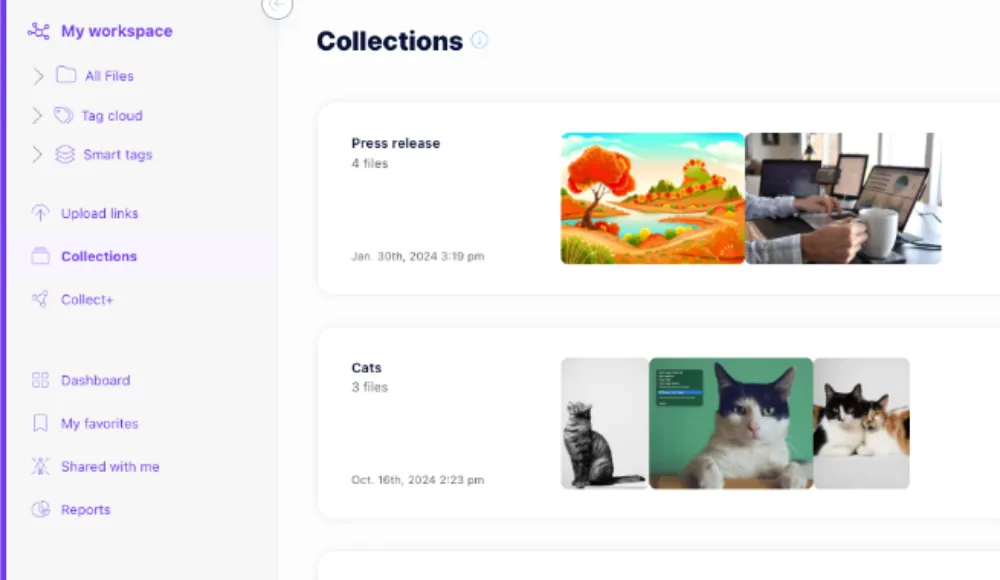
Brand asset management is the process of organizing, controlling, and sharing the files that define how your brand shows up, such as logos, campaign visuals, templates, product images, approved copy, and guidelines. For teams, the goal is not just storage. It is making sure the right people can find approved assets fast and use the right version every time.
If that sounds close to digital asset management, that is because the two overlap. Brand asset management is the brand-focused layer of a governed asset library. It keeps visual identity consistent, reduces version confusion, and gives marketing, design, and web teams a single source of approved files.
Razuna is built for this kind of workflow. It turns scattered brand, marketing, media, and document files into one searchable library with metadata, permissions, version control, secure links, and audit trails. For teams that need order without enterprise complexity, that combination matters.
What is brand asset management?
Brand asset management is the practice of storing, organizing, searching, approving, and distributing brand files in a controlled system.
A strong brand asset management process does three things well:
- Keeps assets easy to find with folders, metadata, labels, and search.
- Controls who can use what with permissions, roles, and approved sharing.
- Protects brand consistency by reducing the chance that someone uses an outdated logo, wrong template, or unapproved campaign file.
That is what makes brand asset management different from a shared drive or generic cloud storage. Those tools can hold files, but they do not help much when your team needs to know which version is approved, which file is current, or who should be allowed to download it.
Why brand teams need governed asset sharing
Most brand teams do not struggle because they have too few files. They struggle because they have too many copies of the same file in too many places.
A designer uploads a new logo package. A marketer saves a copy on their laptop. A web editor grabs an old banner from email. A contractor uses the wrong version in a campaign. Suddenly, the brand looks inconsistent even when everyone thinks they are being careful.
Brand asset management prevents that kind of drift by giving teams governed sharing instead of loose file transfer. In Razuna, files stay in one central library, while access is controlled through permissions, metadata, collections, and secure links. That means approved files stay approved, and the source of truth stays clear.
What makes a good brand asset management system?
A good system has to do more than store files. It has to make brand work faster and safer.
1. Organized assets
Your team should be able to group files by brand, campaign, channel, client, or content type without creating chaos. Folder structure helps, but metadata and custom fields are what make the library scalable.
2. Controlled access
Not everyone should see or edit every asset. A good system lets admins control who can upload, edit, approve, and download files. That protects sensitive files and keeps unfinished work from leaking into production.
3. Search that finds the right file
If people cannot find approved assets quickly, they will reuse whatever is easiest to grab. Razuna uses AI-powered discovery, metadata, and file content indexing so teams can locate the right image, document, or brand file without digging through folders.
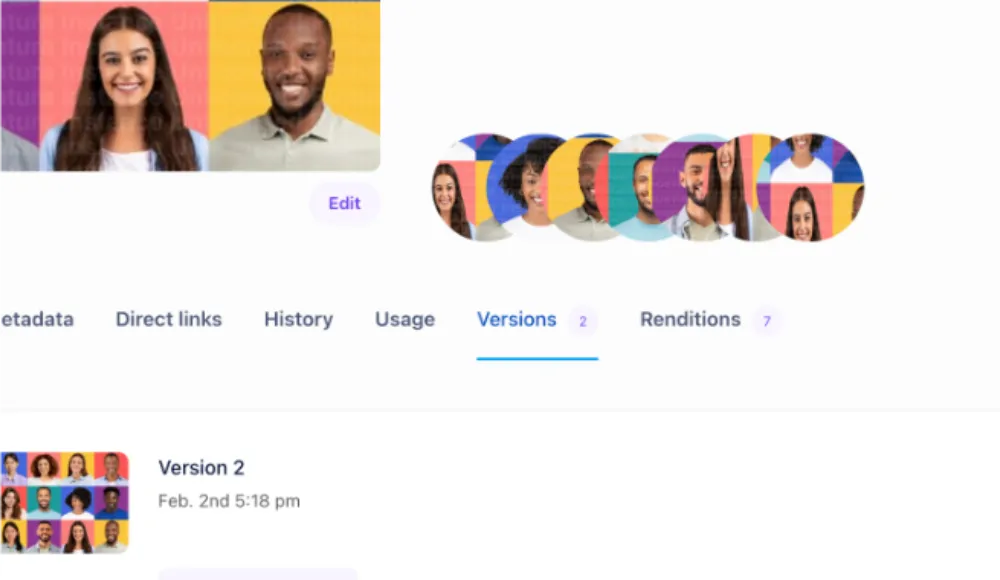
4. Version control
Brand assets change. Logos evolve, campaigns get refreshed, and guidelines are updated. Version control helps teams keep the latest approved file visible while preserving older versions for reference.
5. Easy sharing
Brand files need to move across departments, agencies, and publishing tools. Secure links and integrations make it easier to use approved files in places like WordPress and Shopify without copying everything into separate libraries.
How Razuna supports brand asset management
Razuna is designed for teams that need brand consistency without the overhead of a heavy enterprise DAM. It brings the most important brand controls into one system:
- AI-powered search and discovery to find assets by meaning, not just file name
- Automatic metadata to make assets easier to organize and retrieve
- Custom fields for brand-specific labels, campaign names, or approval status
- Version control to reduce confusion over which file is current
- Permissions and access control to keep sensitive assets protected
- Collections and secure links to share approved files cleanly
- Audit trails to track usage and changes
- Unlimited users on paid plans so access does not become a per-seat tax as the team grows
That combination is useful for marketing teams, brand managers, designers, ecommerce teams, and content editors who need approved assets ready to publish.
For a broader look at how this fits into a governed library, see Razuna's digital asset management guide.
Brand asset management vs shared drives
Shared drives are fine for file storage. They are weak for brand control.
| Capability | Shared drive | Brand asset management in Razuna |
|---|---|---|
| Search | Basic file names and folders | Metadata, labels, AI search, and file content indexing |
| Permissions | Broad folder access | Controlled access by role and workspace |
| Version control | Manual and easy to lose | Built into the asset workflow |
| Approved sharing | Usually informal | Secure links and governed sharing |
| Brand consistency | Hard to enforce | Easier to protect with one source of truth |
The difference is simple. Shared drives store files. Brand asset management helps teams use the right files.
If your team also needs a practical way to move approved files into publishing tools, the Razuna WordPress DAM plugin lets editors search and insert approved assets without copying everything into the WordPress media library. Commerce teams can do something similar with the Razuna Shopify DAM app, which connects approved product media to storefront workflows.
What is document management?
Document management is the process of storing, organizing, searching, and controlling access to business files. Razuna extends that process beyond simple storage by making documents searchable with metadata, custom fields, and governed permissions.
That matters for brand teams because brand work is not only about images and logos. It also includes guidelines, briefs, decks, contracts, pitch documents, and approved copy. Razuna supports documents alongside images, videos, and brand files so teams can keep everything in one governed system instead of splitting content across separate tools.
What is media asset management?
Media asset management is the process of organizing, governing, and distributing media files such as images, video, and audio. It is useful when teams handle large volumes of content that must stay searchable, current, and approved.
Razuna fits this use case because it helps teams manage media assets with metadata, permissions, versioning, and secure sharing. For example, a video team can store campaign clips, a design team can manage source files, and a marketing team can keep approved visuals ready for reuse. The value is not just storage. It is making sure the right media asset reaches the right channel in the right version.
If you want a deeper comparison with adjacent use cases, the Razuna blog includes related guides on DAM, content collaboration, and asset organization.
Who uses brand asset management software?
Brand asset management software is useful anywhere brand consistency matters.
- Marketing teams need campaign files, templates, and approved visuals in one place.
- Brand managers need to protect style, tone, and visual standards across channels.
- Design teams need version control and a clear place to publish finished assets.
- Web and ecommerce teams need approved images and documents they can trust.
- Agencies and contractors need limited, governed access to current assets.
- Operations teams need a searchable archive of files that are easy to retrieve later.
Razuna supports all of these groups by keeping the asset library centralized while still making it easy to share the right file externally or publish it into the tools teams already use.
What is a good file sharing site for business teams?
A good file sharing site for business teams is one that does more than transfer files. It should support permissions, approvals, search, and version control so people can share approved assets without creating extra copies.
That is where Razuna differs from generic file sharing tools. Business teams need governed sharing, not just a download link. They need to know that the asset they send to a partner, editor, or client is the approved version, and they need to be able to find that file again later.
For a quick definition, a good file sharing site should have:
- secure access control
- searchable files and metadata
- version history
- clear approval status
- simple sharing links for internal and external use
If you are evaluating file-sharing workflows more broadly, Razuna also has a stronger fit for teams that want one system for brand files, documents, and media rather than a separate consumer-style transfer tool.
Brand asset management in practice
The best brand asset management setups are not complicated. They are consistent.
A simple workflow might look like this:
- Upload final brand files into Razuna.
- Add metadata, labels, and custom fields.
- Store related items in a collection for a campaign or brand.
- Mark approved files clearly.
- Share the approved version through secure links or connected publishing tools.
- Use version control when updates are needed.
- Keep old files in the library for reference, not for reuse.
That workflow reduces mistakes and gives every team a clearer handoff. It also makes it easier to scale, because the system does the remembering instead of relying on someone to explain which file is current.
Brand asset management FAQ
What is the difference between brand asset management and digital asset management?
Brand asset management focuses on the files that define a brand, such as logos, guidelines, templates, and campaign assets. Digital asset management is broader and can include all kinds of media and documents. In practice, a DAM platform like Razuna can support both.
Is brand asset management only for large companies?
No. Smaller teams often need it even more because they have fewer people to track versions and approvals manually. A central system helps them stay consistent without adding process overhead.
Can brand asset management help with approved content?
Yes. Approved content is one of the main reasons teams use brand asset management software. Razuna lets teams keep approved files searchable, controlled, and easy to share so the wrong version is less likely to leak into a campaign or page.
How does Razuna help with brand consistency?
Razuna helps by combining metadata, permissions, version control, secure sharing, and AI search in one library. That makes it easier for teams to find the right file and use it consistently across channels.
The bottom line
Brand asset management is the difference between keeping files and keeping brand control. If your team needs approved assets, consistent branding, and sharing controls in one place, Razuna gives you a practical way to manage that workflow without per-seat pricing or enterprise sprawl.
If you are comparing related workflows, start with the Razuna home page for the product overview, then review the WordPress integration and Shopify app to see how approved assets move into publishing and commerce.
For more on approved assets and access, see Brand Asset Management: A Practical Workflow Guide and Brand Governance Without the Bureaucracy: How DAM Access Control Actually Works.
Explore brand asset management with Razuna to see how these practices fit your team’s workflow.