What is Media Asset Management Software, and How Does Razuna Fit?
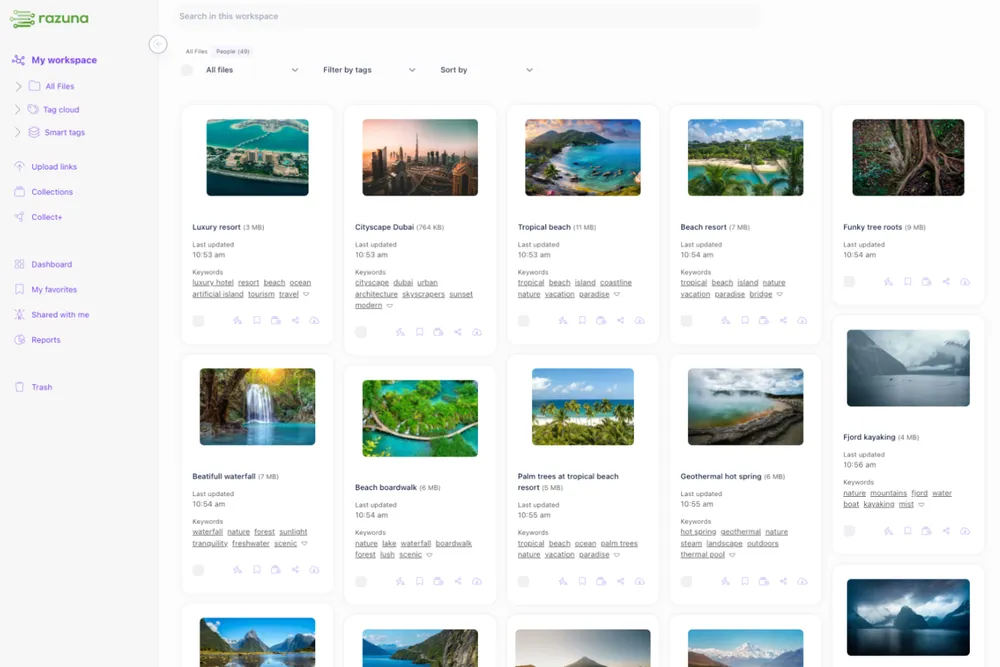
Media asset management software helps teams store, organize, search, share, and control media files in one place. If your team works with images, video, audio, documents, or campaign files, the goal is not just storage. The goal is to make the right file easy to find, safe to share, and simple to reuse without version confusion.
Razuna is built for exactly that kind of workflow. It gives teams a governed library with AI-powered discovery, automatic metadata, version control, permissions, collections, secure links, and audit trails. That makes it useful for teams that need media asset management capabilities without the overhead of enterprise-heavy systems or per-seat pricing.
What is media asset management software?
Media asset management software, often called MAM software, is a system for organizing rich media files and the metadata around them. In practice, that means your team can manage videos, images, audio files, graphics, and related documents in a shared workspace instead of scattering them across drives, inboxes, chat threads, and local folders.
A good MAM system usually helps teams with four things:
- Central storage for media files
- Fast search through metadata, labels, and file content
- Access control so the right people can view, edit, or share assets
- Version control so teams do not reuse outdated files
If you want a broader asset system, Razuna also supports digital asset management workflows for brand, marketing, and document files, which makes it useful when media is only one part of the larger content stack.
Media asset management vs. digital asset management
Media asset management and digital asset management overlap, but they are not identical.
MAM is usually centered on rich media such as video, photography, and audio. DAM is broader and often includes brand files, marketing files, sales collateral, documents, and other content types. For many teams, the best platform does both.
Razuna is a good fit for that overlap because it handles images, video, and documents in a single place. If your team is comparing MAM and DAM, the real question is not which label sounds better. It is whether the system can support your actual workflow, from upload to search to approval to secure sharing.
What MAM buyers usually need
Teams evaluating media asset management software often care about:
- Large-file handling
- Searchable metadata
- Collaboration on creative reviews
- Permission controls
- Asset reuse across campaigns or channels
- Safe sharing with internal teams, agencies, or clients
Razuna maps to those needs with AI-powered discovery, custom metadata, collections, secure links, and role-based permissions. It is especially useful when media files do not live alone but sit alongside brand guidelines, campaign documents, and supporting files.
How Razuna fits media asset management requirements
Razuna is not just a storage bucket. It is a controlled workspace for teams that need media to stay organized and accessible.
1. Search that makes media easier to find
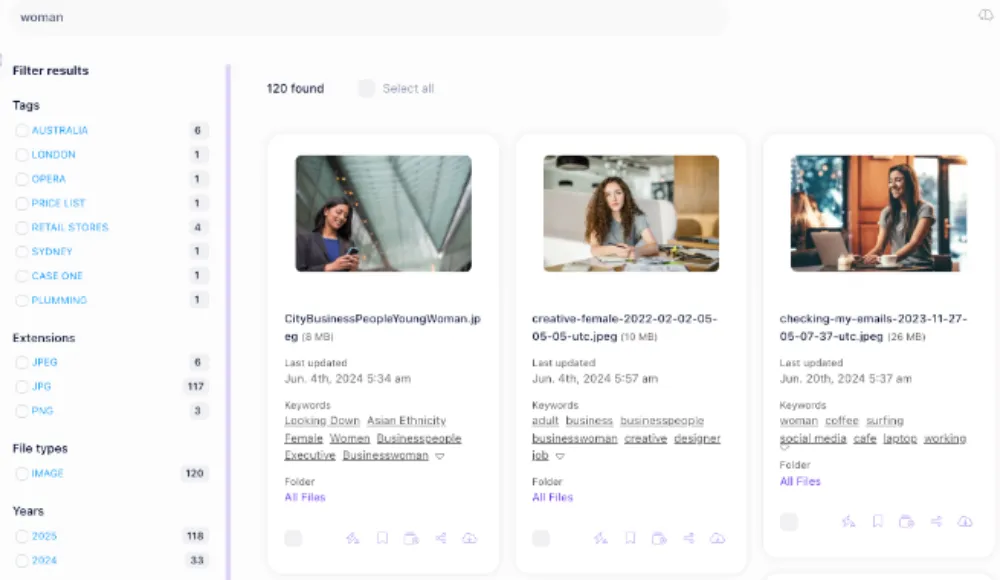
Media teams lose time when they know a file exists but cannot locate it quickly. Razuna solves that with AI-powered discovery and metadata indexing. It can index file metadata, custom descriptions, keywords, and labels, which makes search much more useful than basic filename lookup.
That matters for busy teams because media assets are often reused months after upload. A file that is easy to find once is useful. A file that is easy to find six months later is what saves real time.
2. Metadata and labels for better organization
Media asset management depends on structure. Razuna supports custom metadata and labels so teams can classify files by campaign, format, client, region, usage rights, or any other internal standard.
This is where Razuna also works well as digital file organization software for teams that need a practical workflow, not just cloud storage. Instead of relying on folders alone, teams can organize assets with metadata, labels, collections, and search.
3. Version control for creative teams
Media files change often. A logo gets updated, a video gets revised, a banner gets resized, or a document gets reapproved. Without version control, teams reuse the wrong file and create inconsistencies across channels.
Razuna helps reduce that risk by keeping versions and permissions inside the same governed library. That makes it easier to manage active assets without hunting through old attachments or shared drives.
4. Secure sharing and permissions
Media asset management is not only about access. It is also about controlled access. Razuna includes permissions and secure links so teams can decide who can see what, who can edit, and what gets shared externally.
For agencies, marketing teams, and brand managers, this matters because media often moves between internal stakeholders and outside partners. Secure sharing helps keep distribution simple without making assets public by accident.
If your team is specifically comparing secure distribution options, see how Razuna handles secure file sharing for business in a workflow that keeps assets organized instead of scattered across separate transfer tools.
5. Collections for project-based work
Media teams rarely manage single files in isolation. They work in sets: campaign launch packs, product photo groups, event video bundles, or brand kits. Razuna's collections help teams bundle related assets together so the full set is easier to review, share, and reuse.
That is useful for creative operations because the asset often matters as part of a larger package, not as a standalone file.
Media asset management software vs. file sharing tools
A common mistake is to treat file sharing and media asset management as the same thing. They are related, but they solve different problems.
A file sharing tool moves files from one person to another. Media asset management software organizes files for ongoing use.
File sharing is good for transfer
A file sharing site or link tool is useful when you just need to send something fast. It is often focused on upload, download, and temporary access.
MAM is good for ongoing control
A media asset management system is better when the file will be reused, revised, approved, or redistributed later. It tracks versions, metadata, permissions, and related assets so teams do not lose context.
This is why many teams evaluating a file sharing platform eventually need more than simple transfer. They need a place where the media actually lives, not just a place where it passed through.
If your buying journey starts with sharing, Razuna also fits the broader comparison around best file sharing sites. The difference is that Razuna is designed for teams that need file sharing inside a structured media workflow.
Who should use media asset management software?
Media asset management software is most useful for teams that handle a lot of visual or rich content and need repeatable processes.
Common use cases include:
- Marketing teams managing campaign images and videos
- Brand teams keeping logos, guidelines, and templates consistent
- Creative teams reviewing and revising media assets
- Agencies sharing assets across clients and collaborators
- Content teams storing multimedia alongside supporting documents
Razuna works well for these groups because it combines media handling with the practical controls teams need every day: search, permissions, versioning, and secure distribution.
How Razuna helps teams organize media and documents together
Many teams do not have a pure media-only workflow. They also manage briefs, campaign plans, approvals, pitch decks, and reference files. Razuna supports that mixed environment by handling documents and media in the same governed library.
That means a team can store a video next to the launch brief, a brand guide next to the logo pack, or a PDF next to the campaign images. The benefit is simple: less switching, fewer missing files, and better context.
This also makes Razuna relevant for document management use cases. If a team needs both media and supporting files in one searchable system, Razuna can reduce the gap between asset storage and day-to-day collaboration.
What to look for in media asset management software
If you are comparing platforms, focus on the requirements that affect daily work, not just the headline feature list.
Search and metadata
Can your team find assets by label, keyword, or custom field, or do they have to remember filenames?
Permissions and sharing
Can you control access cleanly, and can you share files securely without creating extra risk?
Version control
Can your team tell which file is current, approved, or ready for reuse?
Collaboration
Can reviewers, marketers, and creatives work from the same system without endless email threads?
Scalability
Can the system support more users, more assets, and more workflows as the team grows?
Razuna is a strong option when these requirements matter because it is built around organization and control rather than just storage. It gives teams a central place to manage media without adding per-seat complexity.
Media asset management software FAQ
What is media asset management software used for?
Media asset management software is used to store, organize, search, share, and control media files such as images, video, audio, and related documents. It helps teams keep assets easy to find and safe to reuse.
Is media asset management the same as file sharing?
No. File sharing is mainly about transferring files from one person to another. Media asset management is about long-term organization, search, version control, and controlled access.
Can Razuna manage documents as well as media files?
Yes. Razuna can manage documents alongside media files, which is useful for teams that keep briefs, brand guides, and campaign files in the same workflow.
What makes Razuna useful for creative and brand teams?
Razuna combines metadata, search, version control, permissions, collections, and secure sharing. That helps creative and brand teams keep assets organized and consistent across projects.
Choosing a media asset management system
The best media asset management software should make your assets easier to use, not harder to manage. If your team is growing, working across departments, or handling both media and documents, the system should support that workflow without adding friction.
Razuna fits teams that want DAM-level organization with practical media handling, secure sharing, and transparent pricing. It gives you a central library for media, brand files, and supporting documents so your team can find the right asset, share it with the right people, and keep every version under control.
To evaluate your media workflow, see MAM vs. DAM: Differences, Similarities & Which Is Right For You and How to Choose Media Asset Management Software.
Explore media asset management with Razuna to see how these practices fit your team’s workflow.