20 Best Bynder Alternatives for Growing DAM Teams in 2026
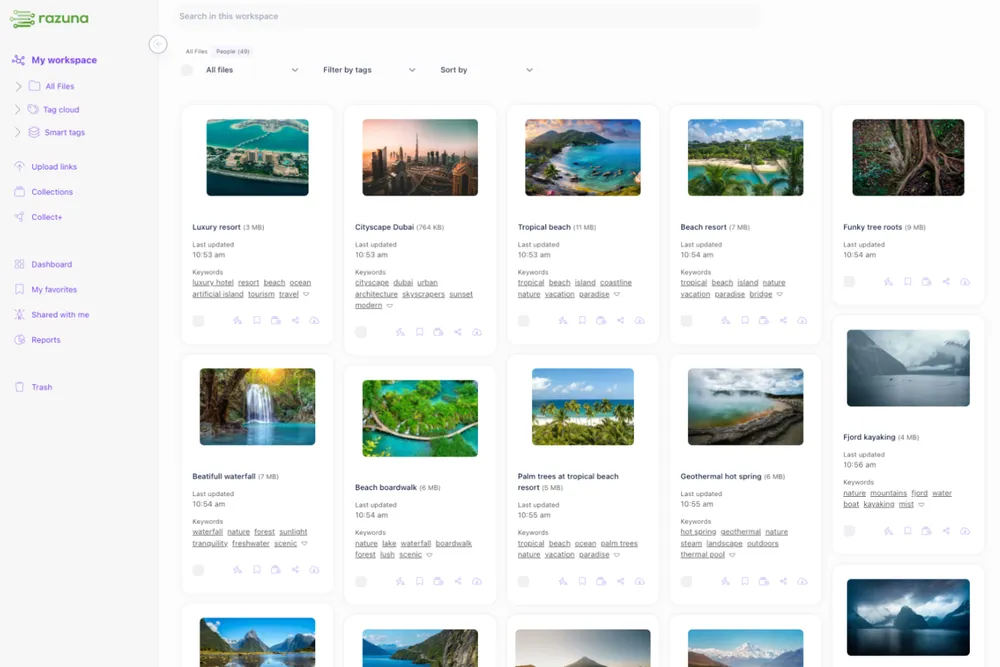
If you are comparing Bynder alternatives, you probably do not need a generic list of storage tools. You need a digital asset management platform that helps teams organize files, search faster, control permissions, and share approved content without losing governance.
That is the lens for this guide. It focuses on DAM-first options for marketing, creative, ecommerce, nonprofit, and regulated teams that need more than a place to park files. It also builds on what the market is already asking for: stronger search, better secure sharing, cleaner brand control, and easier admin work across media libraries.
One useful reference point is The Digital Project Manager's Bynder alternatives roundup, which highlights how teams evaluate DAM tools by search, portals, integrations, and collaboration depth. For teams that want those same outcomes inside a secure asset workflow, Razuna is worth a close look.
What teams usually want from a Bynder alternative
The right replacement depends on the workflow, not the logo on the homepage. In most DAM evaluations, the core questions are the same:
- Can people find the right file quickly through metadata, tags, or semantic search?
- Can admins control who sees, edits, downloads, or shares assets?
- Can brand files stay versioned and consistent across teams?
- Can outside stakeholders review or receive files without exposing the full library?
- Can the system handle images, videos, documents, and campaign files in one place?
That is why the strongest alternatives are usually the ones that combine organization, governance, and sharing instead of just offering simple cloud storage.
20 Bynder alternatives to compare in 2026
Below is a practical shortlist of DAM and adjacent content operations tools that teams often review when they want a different setup from Bynder.
1. Razuna
Razuna is a DAM built for teams that need to organize, search, share, and govern digital assets in one system. It fits teams managing brand libraries, campaign files, documents, and media at the same time.
Where Razuna stands out is the combination of AI-assisted search, metadata indexing, permissions, versioning, and secure sharing. If your pain point is not "where do I put files?" but "how do I keep the right people working from the right version?", Razuna is designed for that problem. It also supports workflows like folder-level access control, bulk editing, direct links, and tagging across workspaces, which helps reduce the manual cleanup that often slows down asset operations.
Use Razuna if your team cares about:
- asset organization with tags, folders, and metadata
- semantic and AI-assisted discovery
- controlled access for internal and external users
- secure delivery of approved files
- brand consistency across campaigns and teams
If you are comparing brand-library use cases specifically, this pairs well with Razuna's brand management workflows and the wider digital content management guidance on the Razuna blog.
2. Canto
Canto is often chosen by marketing teams that want visual asset management with strong search and portal-style sharing. It is a familiar DAM option for teams that need a central asset hub and stakeholder-friendly access.
3. Brandfolder
Brandfolder is commonly reviewed by teams that want brand asset management with a strong emphasis on consistency, approved content, and easy distribution. It is often part of the conversation when teams are prioritizing brand governance.
4. Frontify
Frontify is a brand platform that also supports DAM-style asset management. It is useful when guidelines, brand portals, and asset access need to live close together.
5. Acquia DAM
Acquia DAM is usually considered by larger organizations that need asset governance and structured content operations. Teams often look at it when they want more control over enterprise content processes.
6. Aprimo
Aprimo combines DAM with broader marketing operations use cases. It tends to come up when teams want asset management connected to planning, workflow, and approval processes.
7. MediaValet
MediaValet is a cloud DAM often considered by distributed teams that need centralized asset access. It is commonly evaluated for search, sharing, and enterprise content handling.
8. WoodWing Assets
WoodWing Assets is used by teams that want media and marketing content organized in a structured library. It is a common fit for content-heavy organizations with editorial-style workflows.
9. Bynder alternatives for regulated teams
Some teams do not need a brand-heavy interface. They need governance. For those teams, the best alternative is usually the one that offers permissions, auditability, and controlled delivery without adding friction for users.
10. Dash
Dash is a simpler DAM-style tool that may appeal to smaller teams looking for an easier rollout. It is often reviewed when teams want straightforward asset sharing and tagging without a heavy implementation.
11. Air
Air is built around visual collaboration and asset organization. Teams often explore it when they want a modern interface for collecting, reviewing, and sharing creative files.
12. filecamp
filecamp is frequently considered by smaller teams that want branded portals and basic DAM workflows. It is a practical option when the priority is simple asset access and brand presentation.
13. Northplains
Northplains is an enterprise DAM choice that comes up when organizations need structured content control at scale. It is often evaluated by teams with complex publishing or content distribution needs.
14. Widen
Widen, now part of Acquia's ecosystem, is still referenced in DAM comparisons because of its long history in asset management. Teams usually look at it for enterprise organization and governance.
15. IntelligenceBank
IntelligenceBank is often used by marketing and compliance teams that need to manage brand content with approval and governance requirements. It is a strong consideration where control matters as much as access.
16. MerlinOne
MerlinOne is a DAM option focused on media-heavy teams that need image, video, and metadata management. It is often explored by organizations with large visual libraries.
17. Pics.io
Pics.io is another DAM tool that appeals to teams wanting structured file management and collaborative review. It is often considered by smaller to mid-sized creative teams.
18. Seismic
Seismic is more of a sales enablement platform than a pure DAM, but it often appears in Bynder comparisons because it handles content distribution and approved collateral use cases.
19. OpenText Media Management
OpenText Media Management is typically evaluated by large enterprises with strict governance and content lifecycle needs. It is usually part of a more complex IT-led selection process.
20. Shutterstock Enterprise
Shutterstock Enterprise can be relevant for teams that want access to stock content plus enterprise content workflows. It is not the same as a pure DAM, but it appears in many tool comparisons because teams want sourcing and governance in one place.
How to compare these tools without getting distracted
A long feature list does not tell you whether the system will work for your team. A better evaluation starts with your actual asset workflow.
Start with the asset types you manage
If your library includes images, videos, PDFs, logos, campaign docs, and partner files, the system needs to support all of them without turning search into guesswork. A DAM that handles only one file type well can create workarounds later.
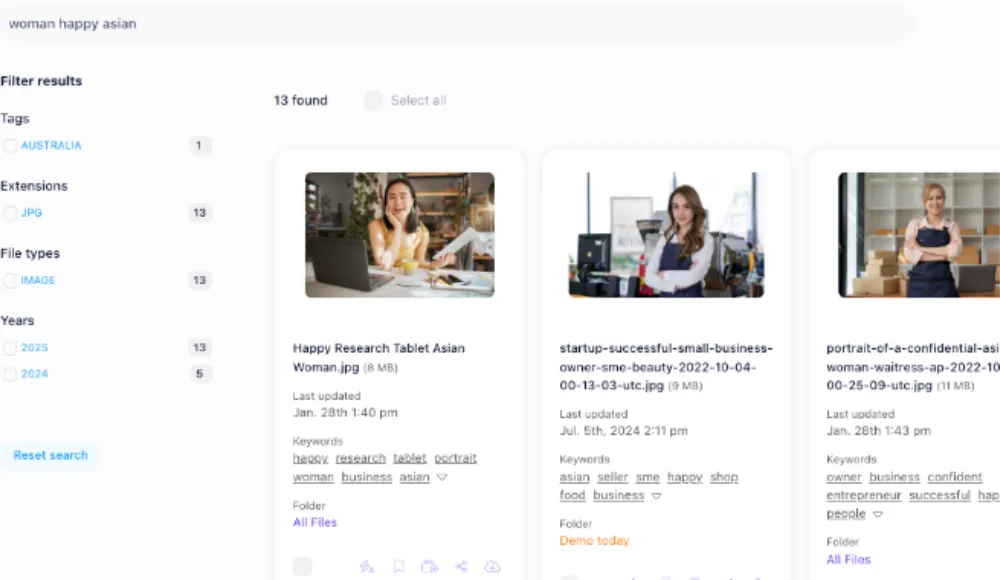
Check search quality, not just search availability
Search matters most when the library grows. Look for:
- metadata indexing
- tag filtering
- OCR or text extraction where useful
- semantic search that can find assets by meaning, not only exact words
Razuna's search approach is especially useful when teams need to find assets faster without relying on folder memory alone. For a closer look at this workflow, see Semantic Search in Razuna.
Treat permissions as a workflow feature
Permissions are not only a security setting. They decide whether teams can move quickly without creating risk. Folder-level access, workspace roles, and share controls help teams give the right access to the right people.
Razuna's recent work on enhanced folder permissions and admin control shows the kind of governance layer that matters when multiple teams share one asset library.
Look for secure sharing that fits your approval process
Sometimes the best alternative is the one that makes external sharing easier without exposing the full library. Direct links, shareable links, and controlled collections are more useful than sending attachments or moving files into separate cloud drives.
Make sure the system supports version control and consistency
Brand teams need to know which file is current, which file is approved, and which version should be used next. If versioning is weak, the library becomes a source of confusion instead of a source of truth.
Why Razuna is a strong Bynder alternative
Razuna is built around the actual work that happens in DAM systems: cleaning up file chaos, making content findable, and keeping access controlled across teams.
It is a strong fit when you need:
- one library for images, videos, documents, and brand assets
- metadata-driven organization
- AI-assisted tagging and search
- folder and workspace permissions
- secure sharing for internal and external stakeholders
- bulk editing to manage large collections efficiently
- reporting that shows how assets are used
That matters because the goal is not simply storing assets. It is reducing the time spent searching, re-creating, re-tagging, and re-sharing files that should already be ready to use.
Razuna also fits neatly into broader file and content operations. If your team is comparing asset systems because it also struggles with collaboration and content handoff, these internal resources help frame the problem:
- What is digital content management?
- Razuna's content collaboration platform guide
- Media asset management vs. DAM
Which alternative should you pick?
If you want a brand-heavy portal with guided presentation, several of the options above are worth reviewing. If you want a DAM that keeps the focus on organization, metadata, search, permissions, and secure delivery, Razuna is the cleaner fit.
A simple way to decide:
- Choose a brand portal-first tool if the main job is external brand presentation.
- Choose an enterprise operations platform if the main job is governance across many systems.
- Choose Razuna if the main job is to keep asset management practical: find files fast, control access, and share the right version with the right people.
That is what most teams really want from a Bynder alternative. Not more complexity. Less searching, fewer mistakes, and a library people trust.
Frequently Asked Questions
What should I look for in a Bynder alternative?
Look for metadata management, search quality, permissions, secure sharing, and version control. If the tool cannot help teams find and distribute approved assets quickly, it will not solve the real workflow problem.
Is Razuna good for marketing teams?
Yes. Razuna works well for marketing teams that manage brand assets, campaign files, and documents in one place. It is especially useful when the team needs search, governance, and secure sharing together.
Do I need a DAM or just cloud storage?
If your team needs metadata, permissions, brand consistency, and asset reuse, you need a DAM. Cloud storage can hold files, but it usually does not solve search, governance, or approved sharing at the same level.
Can a DAM help with brand governance?
Yes. A DAM helps teams keep approved files organized, control access, and avoid version confusion. That is one of the main reasons teams move away from simple file storage and toward tools like Razuna.
Compare your requirements with How to Choose DAM Software: What to Actually Check Before You Sign and Brandfolder Alternatives for Teams That Need DAM + Sharing.
Explore Razuna features to see how these practices fit your team’s workflow.