New in Razuna: Digital Asset Management in Your Terminal with the Razuna CLI
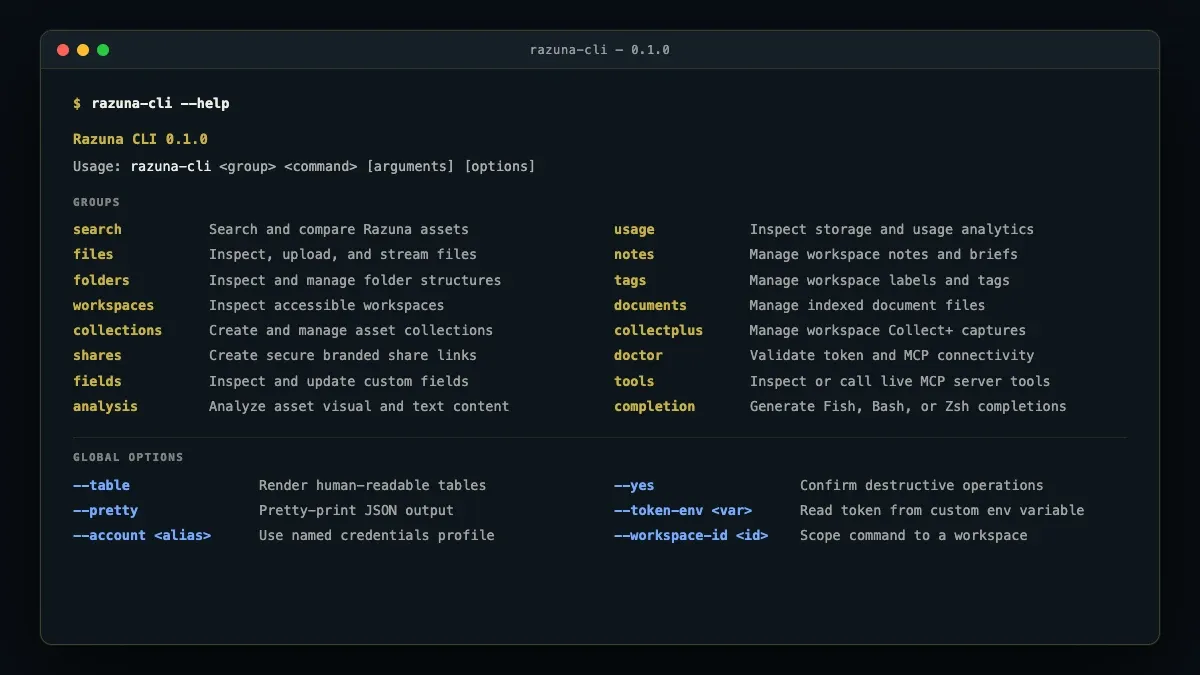
Digital asset management usually lives in the web browser. But media workflows rarely do.
They start in video render queues, photographer ingestion scripts, command-line builds, asset processing pipelines, CI/CD deployments, and increasingly in conversations with AI coding agents. Having to leave your terminal, open a browser tab, drag-and-drop gigabytes of media files, and manually copy links interrupts deep work and makes reliable automation difficult.
That is why we are introducing the Razuna CLI: bringing scriptable, composable, and agent-ready digital asset management directly to your command line.
Bring your asset library into your daily workflows
The Razuna CLI gives developers, creative technologists, marketing operations, and automated agents direct access to Razuna from the terminal.
You can search your digital media library using natural language, stream large file uploads without memory bottlenecks, manage folders and workspaces, inspect metadata and custom fields, and fetch direct links—all without ever leaving your shell.
# Search assets with AI semantic search
razuna-cli search files 'summer campaign hero video' --per-page 5 --pretty

# Stream large video or media uploads directly into a folder
razuna-cli files upload ./brand-render-4k.mov --folder-id FOLDER_ID

# List workspaces or inspect metadata schemas
razuna-cli workspaces list --table
Whether you need to verify that a production build includes the latest brand logo or automate weekly asset ingestion from a camera tether station, the Razuna CLI turns repetitive manual file tasks into single commands.
Designed for automation and developer ergonomics
We built the Razuna CLI with automation in mind from day one:
- Streaming uploads without memory bloat: The CLI streams local files directly to your Razuna storage, so uploading multi-gigabyte 4K videos or large design archives will never exhaust your system memory.
- Piping and script-friendly JSON: Output defaults to clean, compact JSON, making it seamless to pipe results into
jq, shell scripts, cron jobs, or GitHub Actions. - Human-readable tables: When triaging or exploring assets interactively, add the
--tableflag for instant, readable formatting. - Shell completions: Native autocompletion support for Fish, Bash, and Zsh makes discovering flags and commands effortless.
- Dynamic MCP schema discovery: The CLI connects to your Razuna instance and dynamically discovers available tools and commands, ensuring that permissions, custom metadata fields, and workspace rules stay perfectly in sync with the server.
AI agents and autonomous workflows
As development and content teams adopt AI coding agents—such as Claude Code, Cursor, Copilot CLI, or internal agents running via MCP—giving those agents access to governed brand assets has historically been a challenge.
With the Razuna CLI, AI agents operating in terminal sessions can now retrieve approved brand assets, inspect asset metadata, check version histories, and upload newly generated media directly into governed Razuna workspaces. Your assets remain secure, permissions remain enforced, and your team avoids uncontrolled asset sprawl.
Deliberate safety and security defaults
Operating in production and CI environments requires strict security controls:
- Environment variable authentication: Access tokens and API keys are read from environment variables, never command-line arguments that could leak into shell histories or system process tables.
- Explicit confirmation for destructive commands: Commands that delete or overwrite assets require interactive confirmation by default, with a
--yesflag available for headless CI scripts. - Audit trails: All operations performed via the CLI carry full attribution in Razuna audit logs, ensuring visibility across team activities.
Get started today
The Razuna CLI is available now on npm and works with Node.js 24 or newer.
Install the CLI globally using your favorite package manager:
# Using pnpm
pnpm add --global @razuna/cli

# Using npm
npm install --global @razuna/cli
Configure your credentials by setting your API token:
export RAZUNA_API_KEY=your-api-key
export RAZUNA_URL=https://yourcompany.razuna.com
razuna-cli doctor
The Razuna CLI is included with all Unlimited, Unlimited+, and Enterprise plans. To explore all available commands, check the command-line help with razuna-cli --help or visit the comprehensive Razuna CLI Documentation.