Best File Sharing Site for Teams: What to Look For and Why Razuna Fits

If you are trying to choose the best file sharing site for business, the right answer depends on more than storage space. Teams usually need secure links, folder permissions, version control, fast search, and a way to keep files organized after they have been shared.
Razuna is built for that kind of work. It combines file sharing with digital asset management, so teams can store, find, and share media and documents in one governed library instead of juggling separate tools.
What makes a good file sharing site?
A good file sharing site should do more than move files from one person to another. It should help teams share the right version, with the right people, under the right controls.
Here is the checklist that matters most:
- Secure sharing: Look for password protection, expiring links, and access control.
- Folder and workspace permissions: Teams need to control who can view, edit, or download files.
- Large-file support: Marketing, creative, and media teams often share video, images, and design assets.
- Version control: A good platform keeps old versions from getting lost or overwritten.
- Search and organization: If files are hard to find, sharing becomes slow and messy.
- Collaboration features: Notes, collections, and shared folders help teams review and approve work faster.
Razuna supports all of those needs through secure links, folder permissions, collections, version control, metadata, and AI-assisted discovery. That makes it a strong fit for teams that want organized file sharing, not just a place to upload files.
How to choose the best file sharing site for business
If you are comparing tools, start with the workflow, not the brand name. A public sharing tool may be fine for sending one file, but a business team usually needs more structure.
Use this simple decision framework:
| Feature | Basic file sharing tools | Razuna |
|---|---|---|
| Secure links | Often available | Yes, with controlled sharing options |
| Expiring access | Sometimes available | Yes |
| Password protection | Sometimes available | Yes |
| Folder permissions | Limited in many tools | Yes |
| Version control | Varies | Yes |
| Search by metadata | Usually limited | Yes, with AI-powered discovery and metadata |
| Collections and workspaces | Rare | Yes |
| Best for | One-off sharing | Team-based asset organization and sharing |
If your main goal is sending a single file, a simple transfer tool might be enough. If your goal is to keep a shared library clean, searchable, and controlled, Razuna is the better fit.
Why teams choose Razuna for file sharing
Razuna is best for teams that need not just file sharing, but organized, searchable collaboration across workspaces and folders.
Secure upload and sharing links
Razuna gives teams a safer way to share assets with outside partners, clients, and internal reviewers. You can control how files are accessed, which helps reduce the risk of sending the wrong asset or leaving a link open too long.
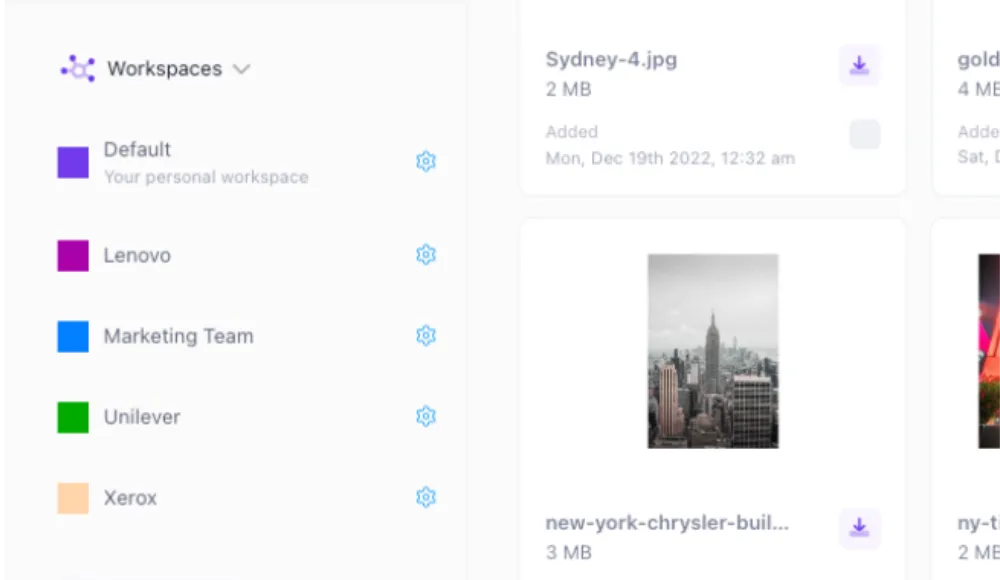
Workspace-based sharing
Files do not live in random inboxes or scattered folders. They live in workspaces and collections, which makes it easier to group assets by project, campaign, client, or department.
Folder search and metadata
Razuna makes files easier to find after they have been uploaded. That matters because the real problem in most teams is not sending a file once. It is finding the right file again next week, or next month, when someone asks for it.
Notes and collaboration
Sharing often breaks down when feedback is spread across email threads, chat messages, and meeting notes. Razuna keeps collaboration closer to the asset itself, so teams can stay aligned.
Version control
When teams share creative files, there is always a risk of confusion over drafts, edits, and final versions. Razuna version control helps reduce that problem by keeping file history organized.
Secure file sharing for business teams
For business teams, secure file sharing usually comes down to three things: who can access the file, how long they can access it, and what they can do with it.
Razuna helps teams handle common business-sharing scenarios like these:
- Marketing approvals: Share campaign assets with reviewers without giving them access to the entire library.
- Client delivery: Send finished assets through controlled links instead of attaching files in email.
- Internal collaboration: Keep team folders structured so creative, marketing, and operations groups can work from the same source of truth.
- Media handoff: Organize large image, video, and document files so production teams can find what they need quickly.
That mix of control and organization is what separates a good file sharing site from a basic upload tool.
File organization software features to look for
Many people search for file organization software when what they really need is a better sharing system. If files are messy, hard to locate, or impossible to track, sharing becomes inefficient.
Look for these file organization software features:
- Tags and metadata: Add searchable details to every file.
- Custom fields: Capture the information your team actually needs.
- Folders and collections: Group assets by campaign, client, or project.
- Permissions: Limit access where it matters.
- Version control: Keep edits from getting lost.
- AI auto-tagging: Save time when large libraries need to be organized quickly.
Razuna covers these areas through metadata tools, custom fields, auto-tagging, collections, and permissions. That is why it fits both the "file organization software" and "best file sharing site" intent.
Digital file organization software that also supports sharing
Some teams want digital file organization software because their current storage system has turned into a dumping ground. Others want it because they are tired of chasing the latest version of a file.
Razuna addresses both problems. It helps teams organize files with metadata and collections, then share them through controlled links and permissions when the file needs to move outside the library.
That matters for teams managing:
- brand assets
- marketing files
- media libraries
- documents
- client deliverables
- large video files
If your team works across those asset types, a shared folder in generic cloud storage may not be enough. A DAM-style system gives you structure that scales.
Media asset management and digital asset management
People often use "media asset management" and "digital asset management" in similar ways, but they are not always the same in practice.
Digital asset management is the broader category. It usually refers to a system for storing, organizing, searching, and sharing digital files.
Media asset management is often used when teams focus more heavily on rich media like images, video, audio, and production assets.
Razuna supports both use cases because it is built for teams managing mixed libraries, including media-heavy collections and everyday business files. If your team needs media asset management plus secure sharing, that overlap is where Razuna is especially useful.
Best file sharing site comparison: what matters most
If you are comparing the best file sharing sites, ask which tool matches the way your team works.
Choose a simple file-sharing tool if you only need to:
- send one-off files
- share a quick download link
- move files between a few people
- avoid setup or library management
Choose Razuna if you need to:
- manage a growing asset library
- keep files searchable
- share assets with controlled permissions
- avoid version confusion
- organize media, brand, and document files in one place
In other words, Razuna is the better choice when sharing is part of a larger file management process.
Frequently Asked Questions
What makes a good file sharing site?
A good file sharing site has secure links, permissions, version control, search, and a simple way to organize files. It should help teams share files without creating confusion about access or file versions. Razuna adds collections, metadata, and workspace-based sharing so teams can keep files organized as they grow.
Which file sharing site is the best?
The best file sharing site depends on your needs. If you only need basic transfer, a lightweight tool may be enough. If you need secure sharing plus DAM-level organization, Razuna is a strong choice because it combines sharing, permissions, search, and version control in one platform.
What is a good file sharing site for business teams?
A good file sharing site for business teams supports secure access, folder permissions, and collaboration on shared assets. It should also help teams keep files organized after they are uploaded. Razuna is built for that use case, especially for marketing, media, and brand teams.
What is the difference between media asset management and digital asset management?
Digital asset management is the broader term for organizing and sharing digital files. Media asset management usually refers more specifically to images, video, audio, and production assets. Razuna supports both, which is helpful for teams that manage mixed content types.
What is the difference between a slogan and a motto?
A slogan is usually a short, catchy phrase used in marketing, while a motto is a guiding statement that reflects values or beliefs. A slogan sells a message, while a motto expresses an identity. This distinction matters in branding content, but it is separate from file sharing and asset management.
Why Razuna works well for teams that share files often
If your team shares files every day, the biggest problem is rarely the actual upload. It is everything around the upload: who has access, where the file lives, whether the file is current, and how fast the team can find it again.
Razuna is built to solve that broader workflow. It brings together secure sharing, organization, search, permissions, collections, and version control so teams can keep moving without losing control of their assets.
If you need a file sharing site that does more than send files, Razuna gives you a structured way to manage them too.
Related reading
- What is DAM Software: A Comprehensive Guide
- What Is Document Management? Definition, Features & Benefits
- Now available: Auto-tagging
- Now available: Custom Fields
- MAM vs. DAM: Differences, Similarities & Which Is Right For You
- New in Razuna: Collections & sharing of individual files
For the sharing and access-control details, see Brand Governance Without the Bureaucracy: How DAM Access Control Actually Works.
Explore secure file sharing with Razuna to see how these practices fit your team’s workflow.