Best File Sharing Site for Business Teams: How to Share Files Securely
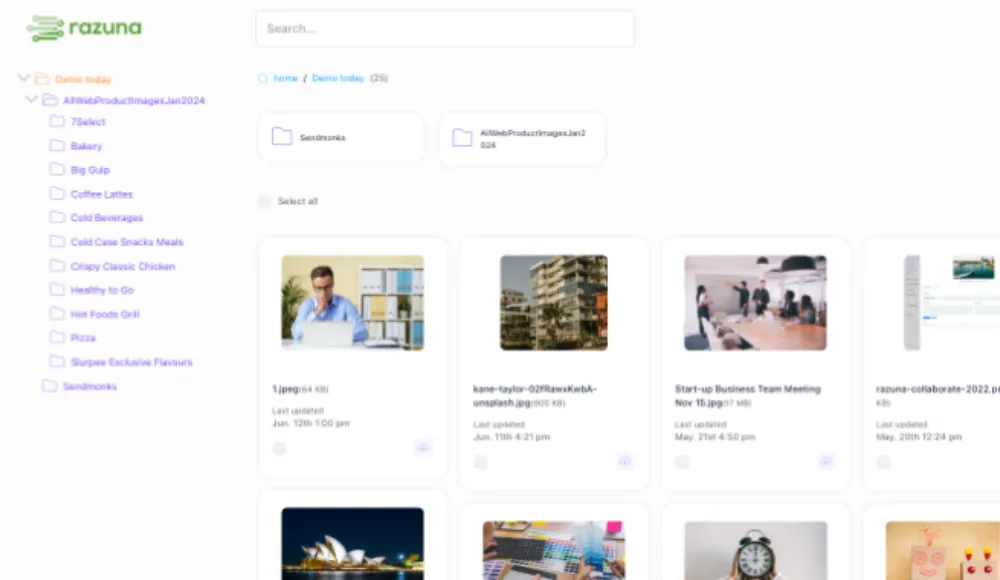
If your team is still sharing files through email threads, consumer cloud drives, or scattered download links, the problem is rarely storage. It is control. Business teams need a file sharing setup that lets people send the right files to the right people without losing track of versions, permissions, or usage.
Razuna is built for that exact job. It combines secure file sharing, brand asset management, and digital asset management in one place, so teams can organize files, control access, and share assets without turning the process into a mess. Unlimited users on paid plans also means you can involve contractors, agencies, and internal teams without paying per seat.
What makes a good file sharing site?
A good file sharing site does more than move a file from one person to another. It should help you share files safely, keep control over who can see what, and make it easy to find the right version later.
Here are the features that matter most for business use:
- Access control: You should be able to decide who can view, edit, or share files.
- Workspace or folder permissions: Teams need permission settings that work at the group and folder level, not just one blanket access rule.
- Private sharing: Sharing should not expose your whole library.
- Direct links: A good system should let you link to a specific file, not only a collection or folder.
- Search and organization: If people cannot find files quickly, sharing becomes a support problem.
- Auditability: For business teams, it helps to know what was shared, by whom, and from where.
- Scalable collaboration: The system should work when you have five users or fifty.
That is why many teams outgrow generic file sharing websites. Those tools are fine for moving documents around, but they usually fall short when files are tied to brand, marketing, legal, or client-facing workflows.
Secure file sharing for business teams
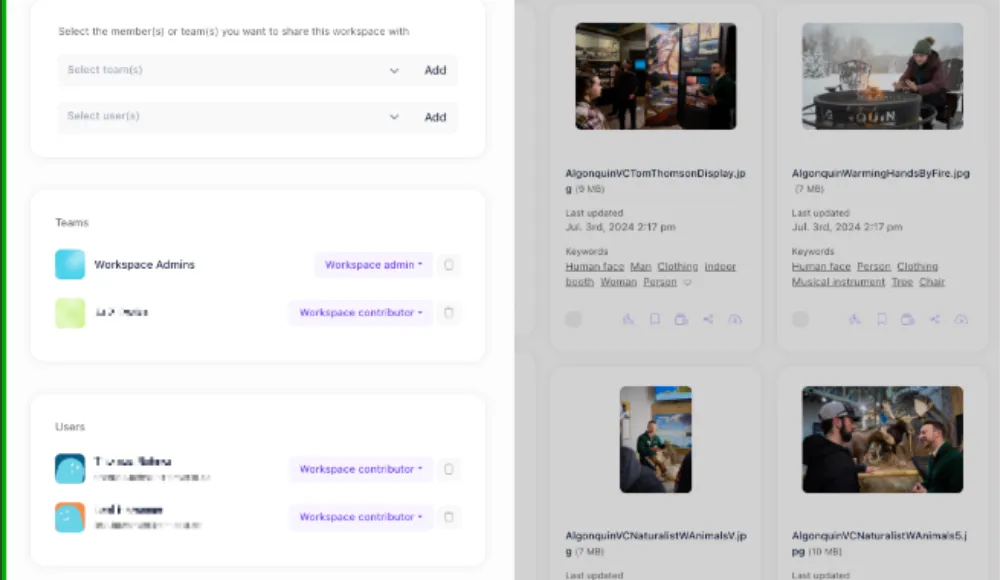
Secure file sharing for business means giving the right people access without opening everything to everyone. In Razuna, that starts with controlled access to workspaces and folders, so teams can keep sensitive files separate from general assets.
A practical secure-sharing workflow looks like this:
- Store the file in the correct workspace or folder.
- Assign the right permissions to the people who need access.
- Share a private link or direct link instead of sending the file around manually.
- Use collections or folder structures when you need to group related files.
- Keep version control in place so people do not work from the wrong file.
That setup is useful for marketing teams sharing campaign assets, brand teams distributing approved logos and guidelines, and operations teams sending documents that should not live in a public inbox. Razuna also supports audit trails, which helps teams understand how files move through the organization.
Razuna vs. generic file sharing sites
If you are comparing file sharing sites, the real question is not "Can it upload a file?" It is "Can it support a business workflow?"
| Capability | Generic file sharing site | Razuna |
|---|---|---|
| User pricing | Often per seat or limited by user tiers | Unlimited users on paid plans |
| Permissions | Basic view or edit controls | Workspace and folder permissions |
| Sharing methods | Download links and public shares | Secure links and direct links |
| Search | Basic filename search | AI-powered discovery and metadata search |
| Organization | Simple folders | Folders, collections, tags, and metadata |
| Brand workflow | Limited or absent | Built for brand asset management and DAM |
| Auditability | Often limited | Audit trails and controlled access |
If your team just needs to send a single file once in a while, a simple file sharing website may be enough. If your team needs to manage approved assets, keep brand files organized, and share them repeatedly with different groups, Razuna is a better fit.
How to share files securely as a business
Here is the short version:
- Keep files in a governed workspace
Do not place business-critical files in a flat, open folder structure. Put them where permissions can be managed. - Use folder-level access where possible
Not every team needs the same access. Folder permissions help reduce accidental exposure. - Share direct links when you want precision
Direct links are useful when a recipient needs one file, not an entire folder or collection. - Use private links for broader sharing
When you need to distribute a package of assets, private sharing gives you more control than sending attachments. - Track versions
If the same file gets updated often, version control keeps people from downloading outdated assets. - Review who has access
As teams change, permissions should change too. That matters for contractors, agencies, and temporary collaborators. - Keep searchable metadata on the file
Tags, labels, and descriptions make it easier to find and reuse assets later, which cuts down on duplicate uploads.
Razuna supports this workflow with permissions, secure links, direct links, collections, and metadata-driven search. That makes it a better fit for teams that care about both access and organization.
File organization matters as much as file sharing
A lot of file-sharing pain is really file-organization pain. If people cannot find the right asset, they will keep re-uploading it, renaming it, or asking someone else to send it again.
Razuna helps teams organize files with:
- folders and subfolders
- tags and metadata
- collections for grouped assets
- AI-powered discovery
- searchable labels and descriptions
- version control for updated files
That matters for brand and marketing teams because the same asset often has multiple approved uses. A logo, campaign banner, product image, or brand guideline may need to be shared with different people under different rules. A file organizer that also handles permissions makes that workflow much easier.
If you are looking for a deeper workflow view, see practical strategies for organizing digital assets.
Why Razuna fits brand asset management and file sharing
Razuna is not only a file sharing tool. It is also a brand asset management and digital asset management platform for teams that need more structure than shared drives can provide.
That combination helps when you need to:
- keep brand assets in one place
- share approved files with internal teams or outside partners
- control who can edit or download assets
- store logos, campaign files, documents, and media together
- keep the latest version easy to find
- avoid per-seat pricing as the team grows
This is especially useful for companies that manage brand files across departments. For example, a marketing lead may need to share campaign assets with designers, agencies, and regional teams, while legal needs tighter access to final approvals. Razuna lets those groups work in the same system without seeing more than they should.
For a broader category overview, read what brand asset management involves and What Is a Digital Asset Management (DAM) Tool?.
Brandfolder alternatives and Bynder alternatives: what buyers usually want
When teams search for Brandfolder alternatives or Bynder alternatives, they are often asking for the same thing: a simpler way to manage brand assets without losing control over sharing and permissions.
Here is a practical comparison of what to look for.
| Evaluation area | Brandfolder alternatives | Bynder alternatives | Razuna |
|---|---|---|---|
| Permissions | Fine-grained access matters | Fine-grained access matters | Workspace and folder permissions |
| Unlimited users | Often limited by plan or pricing model | Often limited by plan or pricing model | Unlimited users on paid plans |
| Sharing methods | Secure links and controlled distribution | Secure links and controlled distribution | Private links and direct links |
| Brand workflows | Brand assets, approvals, versioning | Brand assets, approvals, versioning | Brand asset management with DAM features |
| Admin simplicity | Prefer fewer layers to manage | Prefer fewer layers to manage | Built for teams that want DAM-level control without enterprise complexity |
If your team wants a tool that is easier to administer and still supports secure sharing, Razuna is a strong fit. It gives you the structure of a DAM system without pushing you into per-seat pricing or enterprise-heavy setup.
For a more focused comparison, see Brandfolder alternatives for teams that need DAM + sharing and how to choose DAM software.
When should you choose a file sharing website instead of a DAM?
A file sharing website is fine when the need is simple: send one file, collect one document, or hand off a quick download. But once files become part of a repeatable workflow, a DAM starts to make more sense.
Choose a file sharing website if you:
- only need basic transfer
- rarely reuse the same files
- do not need complex permissions
- do not manage brand assets or approved creative files
Choose Razuna if you:
- share files with internal teams and outside partners
- need workspace or folder permissions
- manage brand assets, creative files, or documents in one library
- want version control and auditability
- need secure sharing that scales with the team
That is why Razuna is often a better answer to "which file sharing site is the best" for business users. It is built for collaboration, but also for governance.
Frequently Asked Questions
What is a good file sharing site for business?
A good file sharing site for business is one that lets you control access, share securely, and organize files in a way that scales. Razuna fits that need because it combines secure links, permissions, direct links, and asset organization for team workflows.
How do I share files securely with a team?
Use a system with workspace or folder permissions, private links, and version control. Razuna supports all three, so you can share files with the right people without exposing the full library.
What is file organizer software?
File organizer software helps teams store, tag, search, and retrieve files in a structured way. In Razuna, that includes folders, subfolders, tags, metadata, and direct links, which makes it easier to manage business assets at scale.
Is Razuna only for brand assets?
No. Razuna is strong for brand asset management, but it also works as a secure file sharing and digital asset management platform for marketing, media, documents, and other business files.
If your team has outgrown shared drives and needs file sharing that is actually controlled, searchable, and built for collaboration, Razuna is a better place to keep everything together.
For the sharing and access-control details, see New in Razuna: Collections & sharing of individual files and Brand Governance Without the Bureaucracy: How DAM Access Control Actually Works.
Explore secure file sharing with Razuna to see how these practices fit your team’s workflow.