New: Direct links
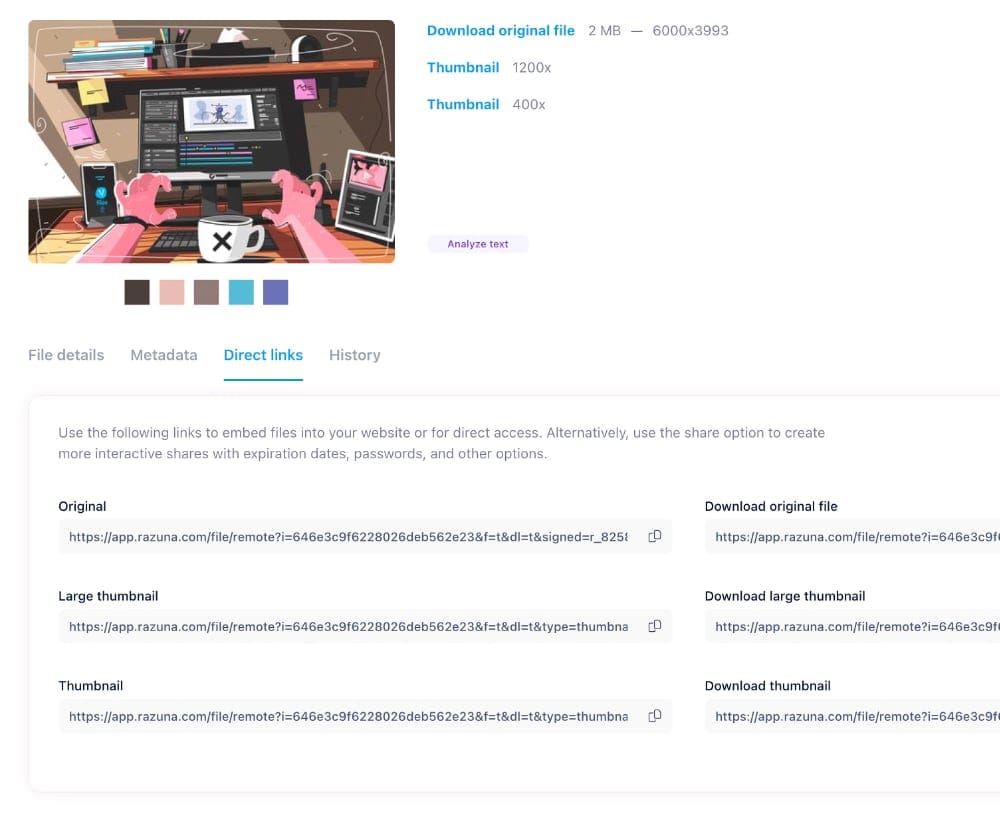
A direct link in Razuna points to the file itself. Use it when the destination needs to display or download an individual asset. A share link opens a page for a file, folder, or collection, giving recipients a place to browse the content you are sharing.
The right choice depends on what happens after someone follows the link. Do they need the file, or do they need a page where they can review a group of assets?
When a direct link makes sense
Direct links are useful when another tool asks for a file URL. For example, a website editor may need the address of an image, or a colleague may need a link to download a particular document. The URL points to the asset instead of an intermediate sharing page.
A browser may display the file or download it, depending on the file type and how it is served. Test the link in the destination where you intend to use it. An image that opens in a browser and a document that downloads can both be working as expected.
When to use a share link
Use a share link when recipients need context or several files. A campaign handoff might include photos, logos, and a brief. A sharing page gives the recipient somewhere to review those materials together, rather than receiving a separate direct URL for every asset.
This distinction also helps when communicating with colleagues. “Here is the image URL for the website” and “Here is the collection for your review” describe different tasks. Choosing the link to match the task avoids an extra round of explanations.
Check the file and the destination
- Confirm that you selected the intended asset and version.
- Check whether the destination expects a file URL or accepts a sharing page.
- Test the link as the intended recipient, including without your own signed-in session where appropriate.
- Verify that the file displays or downloads as expected in the tool that will use it.
Treat distribution as part of the workflow. Only place a file URL on a public website when the asset is intended for that audience. Before sending confidential material, review the access requirements and sharing controls that apply to your use case.
Keep asset handoffs clear
Direct links and share links give you two ways to deliver content from your library. Choose a direct link for the individual file and a share link for a page-based handoff. Keep a record of where important assets are used so the next person maintaining the website or campaign knows which file to check.
Read more about file sharing for teams, or see the Razuna feature overview for related organization and collaboration tools.