Copy tags and one more thing
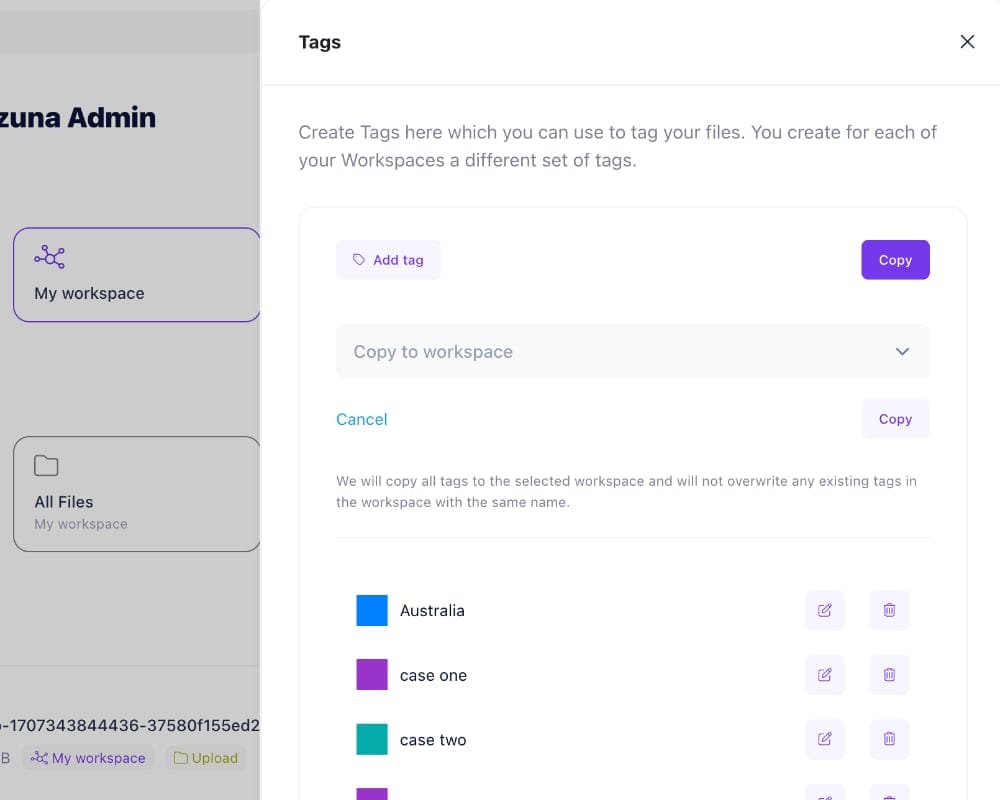
Razuna lets you copy tags from one workspace to another, so you can reuse the terms your team already knows. This update also introduced improvements to file indexing. Together, the changes help with two common jobs: keeping an asset library organized and making newly uploaded files easier to find.
Why copy tags between workspaces?
Separate workspaces can serve different teams, brands, or clients, but they often need some of the same vocabulary. A product photography team and a marketing team might both use tags for product ranges, campaign names, or content types. Recreating those terms by hand leaves room for small differences that become confusing later.
Copying tags gives another workspace a consistent starting point. People can use familiar terms instead of inventing a new naming scheme for every library. It also reduces the setup work when you create a workspace for a new project.
Choose which terms are worth reusing
Before copying a tag set, review whether its terms make sense in the destination workspace. A general tag such as “product photography” may be useful across several teams. A tag tied to a completed client project may not belong in a new library.
- Agree on one name for each recurring subject, campaign, or asset type.
- Check for spelling variations and terms that describe the same thing.
- Explain what each shared term means to the people adding files.
- Keep tags specific to a client or project where they are relevant.
For example, an agency opening a workspace for another client could reuse its standard content-type vocabulary while choosing separate campaign tags. That keeps the organizational approach familiar without assuming every client has the same projects.
Faster indexing supports everyday search
Indexing prepares information about files so search can find them. The indexing work announced with this release was aimed at reducing the wait between uploading content and finding it in Razuna. That matters when a team adds a batch of assets and colleagues need to start working with them.
Tags and indexing solve different parts of the same problem. Tags supply terms that make sense to your team; indexing makes file information available to search. Consistent descriptions remain useful even as your library grows and search tools improve.
Build a library your team can understand
Start with a small set of useful tags, try them on real files, and ask a colleague to find those assets. Their search terms can reveal gaps in your vocabulary. Review the structure as new projects arrive instead of letting duplicate or outdated terms accumulate.
See Razuna's organization and search features for the wider workflow, or visit the Razuna documentation for current product guidance.